Browser: Log into AmpliFund, https://ne.amplifund.com using Google Chrome, Mozilla Firefox, or Microsoft Edge.
What is an External User?
An External User is someone that does not work at the Applicant/Recipient Organization. The External User applies or manages an Award, like a consultant or certified administrator.
Getting Started
Organizations (including External User Organizations) need separate accounts. Additional users then can be added to that 1 respective account. Example: Organizations can add a User from a different Organization (External User) to their account.
NOTE: Individual users should not create individual organizations. Verify your Organization doesn’t already have an AmpliFund account before requesting one.
Logging In
If you are an External User, verify you have a Recipient Portal. You will need a Recipient Portal even if you are just applying on behalf of another Organization and not managing their Award yet.
If you have a Recipient Portal, when you login initially, you will have a left navigation icons (Activity, Grant Management, Reports, etc.). If you do not have a Recipient Portal, please contact AmpliFund Customer Support for them to create one for your External User organization. Do not register at this point.
Recipient Portal
Verify your Organization's name is to the left of your Username (in the top right), or your Organization's name is in the dropdown. If it is not, contact AmpliFund Customer Support for a Recipient Portal.
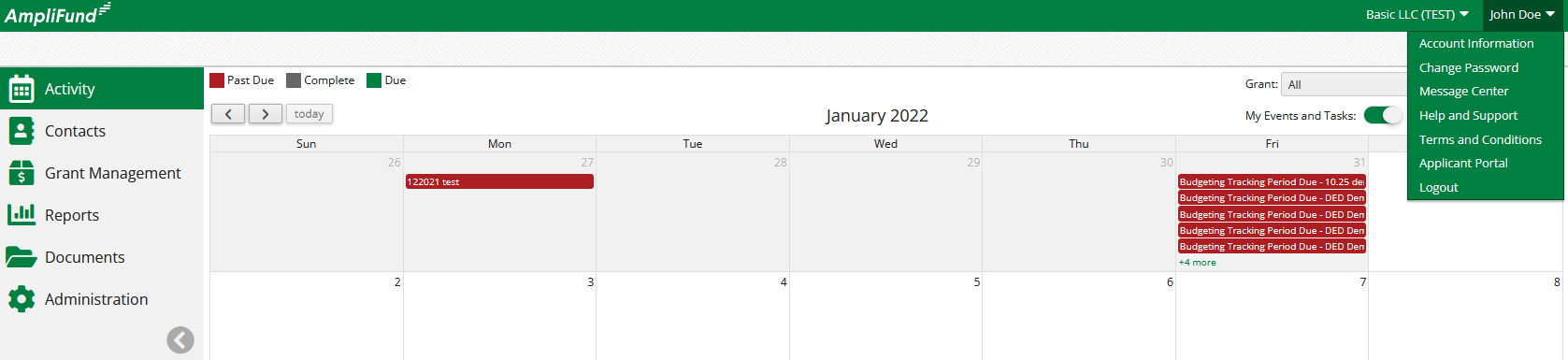
Applicant Portal
If you only have an Applicant Portal, contact AmpliFund Customer Support for a Recipient Portal.
How does the ‘Other Account’ add me as a user?
Follow the flowchart below.
In order to have the External User added to the 'Other Account' (who they are applying on behalf of):
Step 1: External User will need its own Recipient Portal for their Organization.
Step 2: 'Other Account' will need its own Recipient Portal.
Step 3: 'Other Account' will be able to add the External User to the Recipient Portal ('Other Account' will be able to turn on and off access to their Applicant Portal)
Flowchart
*The External User needs to be added to their organization’s own Recipient portal as well.
'Contact AmpliFund Customer Support' to request a Recipient Portal.